Advanced settings
VPN for selected apps only
Our service lets you fine-tune VPN routing with your personal choice of apps that will use the VPN.
By default, HideMeleon works as a global proxy: Russian and local sites are reachable directly, while everything else goes through the VPN. This page is for users who want finer control and to proxy only selected apps.
When to use this
Per-app proxy mode is useful if:
- Russian apps refuse to open until you disable VPN traffic.
- You know your traffic pattern: VPN only for messengers and browser, while games and streaming stay untunneled.
- You use apps that behave poorly over VPN (corporate tools, local services).
Before you start
- Install HAPP and add your standard HideMeleon subscription — from the dashboard or Telegram bot.
- Confirm the subscription refreshed and HideMeleon servers appear in HAPP.
Platform instructions
Android — full support
Per-app proxy on Android
On Android, HAPP can route only selected apps through the system VPN (TUN). All other apps use your regular connection.
-
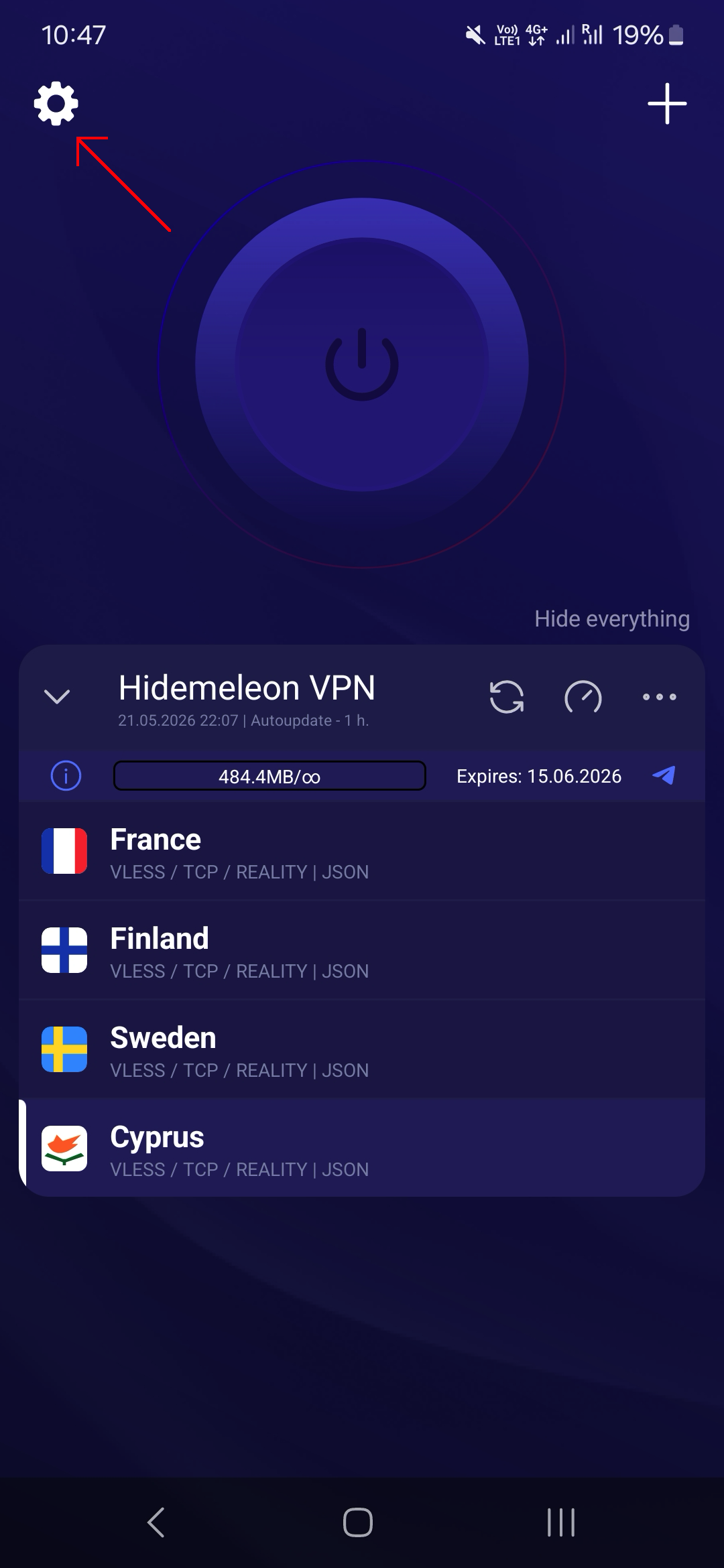
Open HAPP → Settings (gear icon in the top-left corner).
-
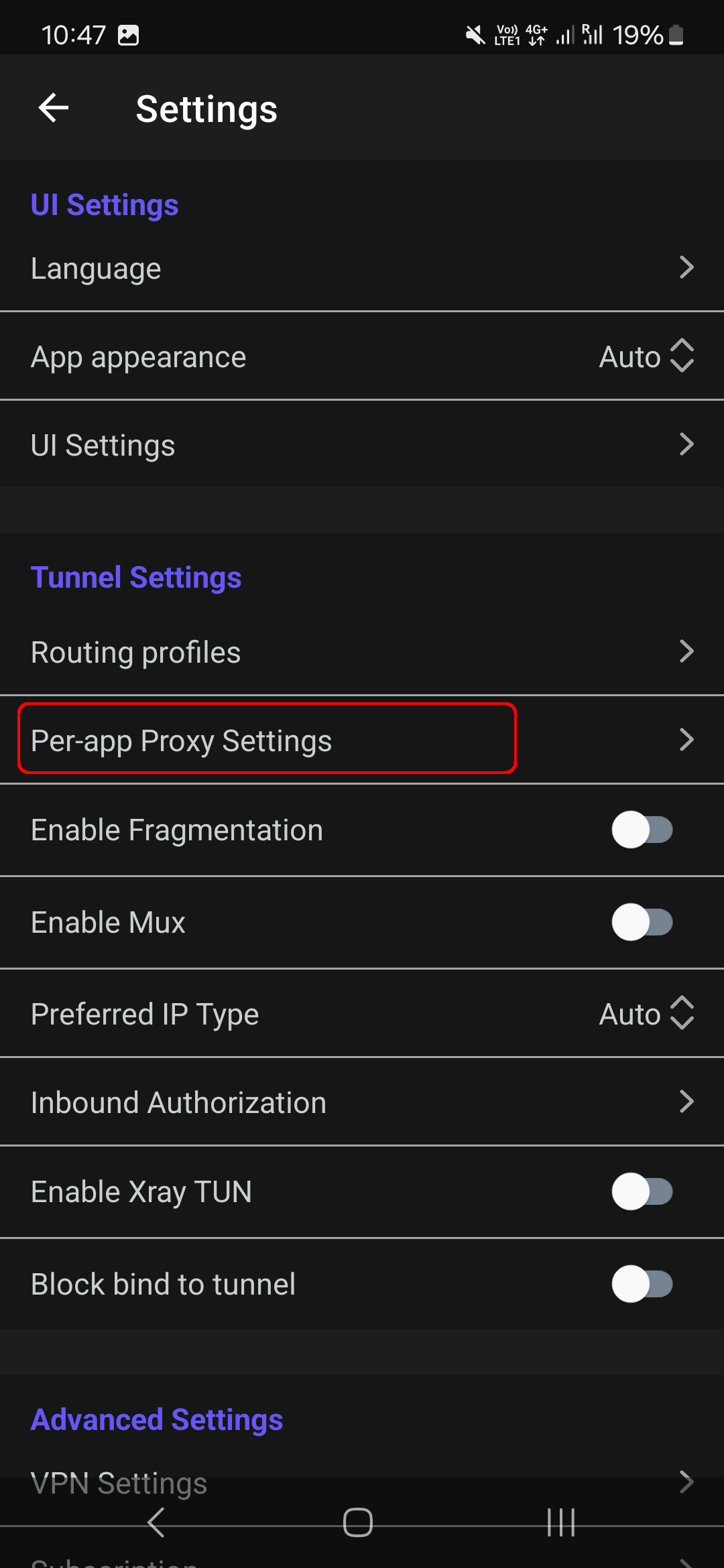
Find Per-app proxy / Proxy for selected apps.
-
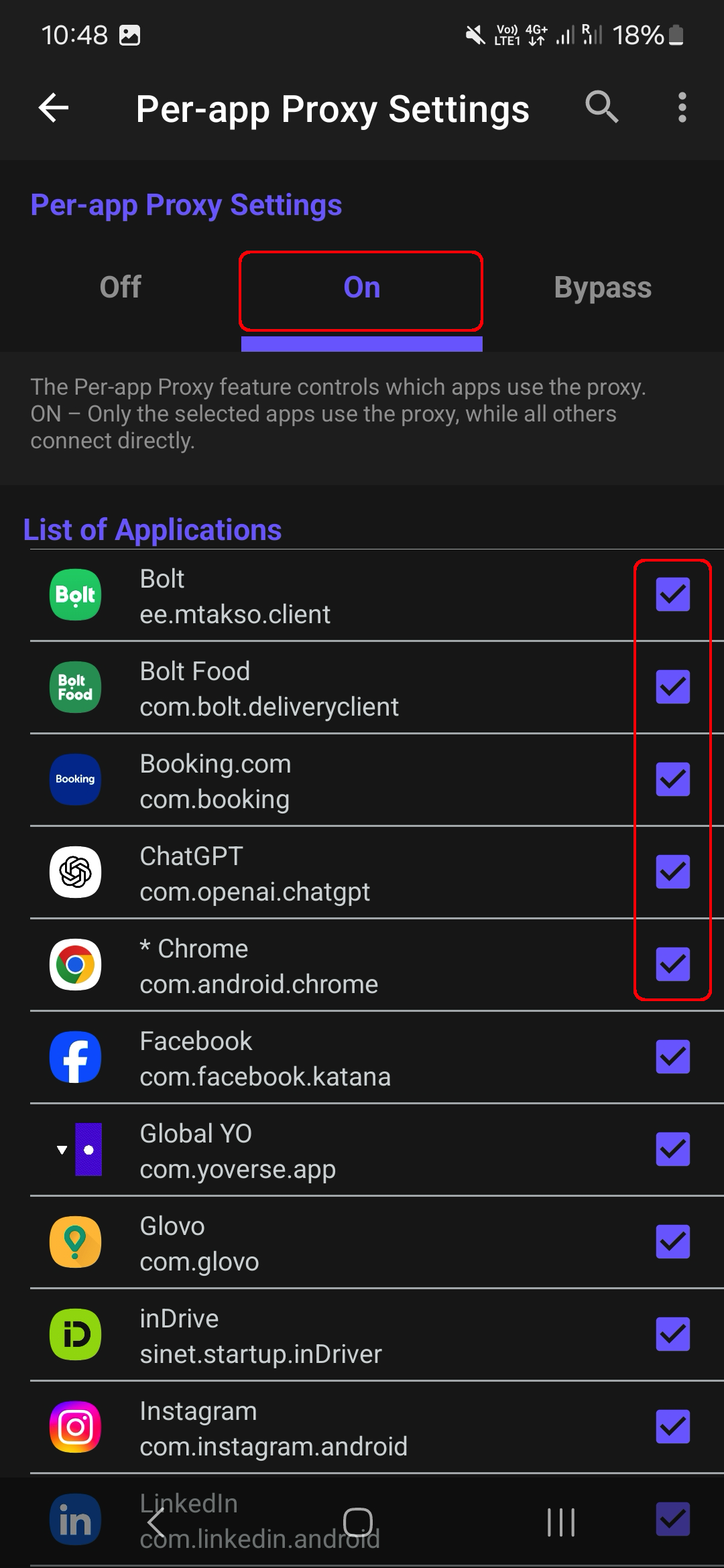
Inside, set On for Proxy for selected apps mode and check the apps you need (Instagram, Telegram, Chrome, etc.). If an app is missing, install it first, then refresh the list.
- Return to the main screen, pick a HideMeleon server, and connect.
- Verify: open a proxied app (should route through VPN) and a local app like banking (should stay direct).
Tip: for the opposite — VPN for everything except a few apps — use invert / all except selected in HAPP settings.
Windows / macOS / Linux
Per-app proxy on desktop
On desktop, HAPP uses a TUN interface. Per-app routing is configured manually in the app.
- Download and install HAPP for Windows/macOS/Linux from happ.su.
- Add your HideMeleon subscription and disconnect any active session.
- Open Settings → Per-app proxy settings (or App routing).
- Enable Selected apps go through proxy.
- On Windows: run HAPP as Administrator, then add apps from the process list or browse for the
.exefile. - Restart the VPN session (disconnect and reconnect) so the list takes effect.
On desktop, the app list is manual — HideMeleon does not push it via subscription yet. Process names and
.exe paths depend on your HAPP version and OS.
iOS — limitations
iPhone and iPad
HAPP on iOS does not support per-app proxy: Apple does not allow per-app VPN selection like Android. On iOS the VPN applies device-wide (with optional local network exclusions in HAPP). Use the standard HideMeleon subscription, or use Android/desktop for selected-apps-only routing.
Per-app proxy modes
HAPP typically offers three modes:
- Off — global VPN for all traffic (HideMeleon default).
- Selected / On — only checked apps use the VPN.
- Bypass / Invert — everything uses the VPN except checked apps.
Example apps (Android)
Popular apps and their Android package IDs. Use these as a reference when picking apps in HAPP (the label in the list may differ — match by icon and name).
| App | Package ID (Android) |
|---|---|
com.instagram.android |
|
| Telegram | org.telegram.messenger |
| YouTube | com.google.android.youtube |
| Chrome | com.android.chrome |
| X (Twitter) | com.twitter.android |
| TikTok | com.zhiliaoapp.musically |
com.whatsapp |
|
| Discord | com.discord |
Package IDs are useful when verifying installs or using HAPP advanced parameters manually.
Tips
- After changing the app list, reconnect VPN in HAPP.
- If an app is missing from the list — install it, restart HAPP, and refresh your subscription.
- Banking and government apps often block VPN — leave them unchecked in proxy-selected mode.
- You can keep two subscriptions in HAPP: standard HideMeleon (global) and a separate per-app profile — switch as needed.
Troubleshooting
- App still uses VPN — confirm you chose selected-only mode, not invert/bypass.
- App does not use VPN — make sure it is checked and you restarted the VPN session.
- On Windows — run HAPP as Administrator and disconnect VPN before editing the list.
- Update HAPP to the latest version and refresh your HideMeleon subscription (pull down on the subscriptions screen).
Need help? Message our Telegram bot @hidemeleon_bot — support can assist for your platform.